Computer use · Accounting operations
GPT-6 Astra for Accounting: Delegate Browser Work Without API Access
Your team should not have to prepare every engagement folder, select every form and check every saved setting by hand just because an integration cannot reach the task. Susan uses GPT-6 Astra browser workers to operate accounting software through its screens, with Sol coordinating the assignment and Susan’s team managing the workflow.
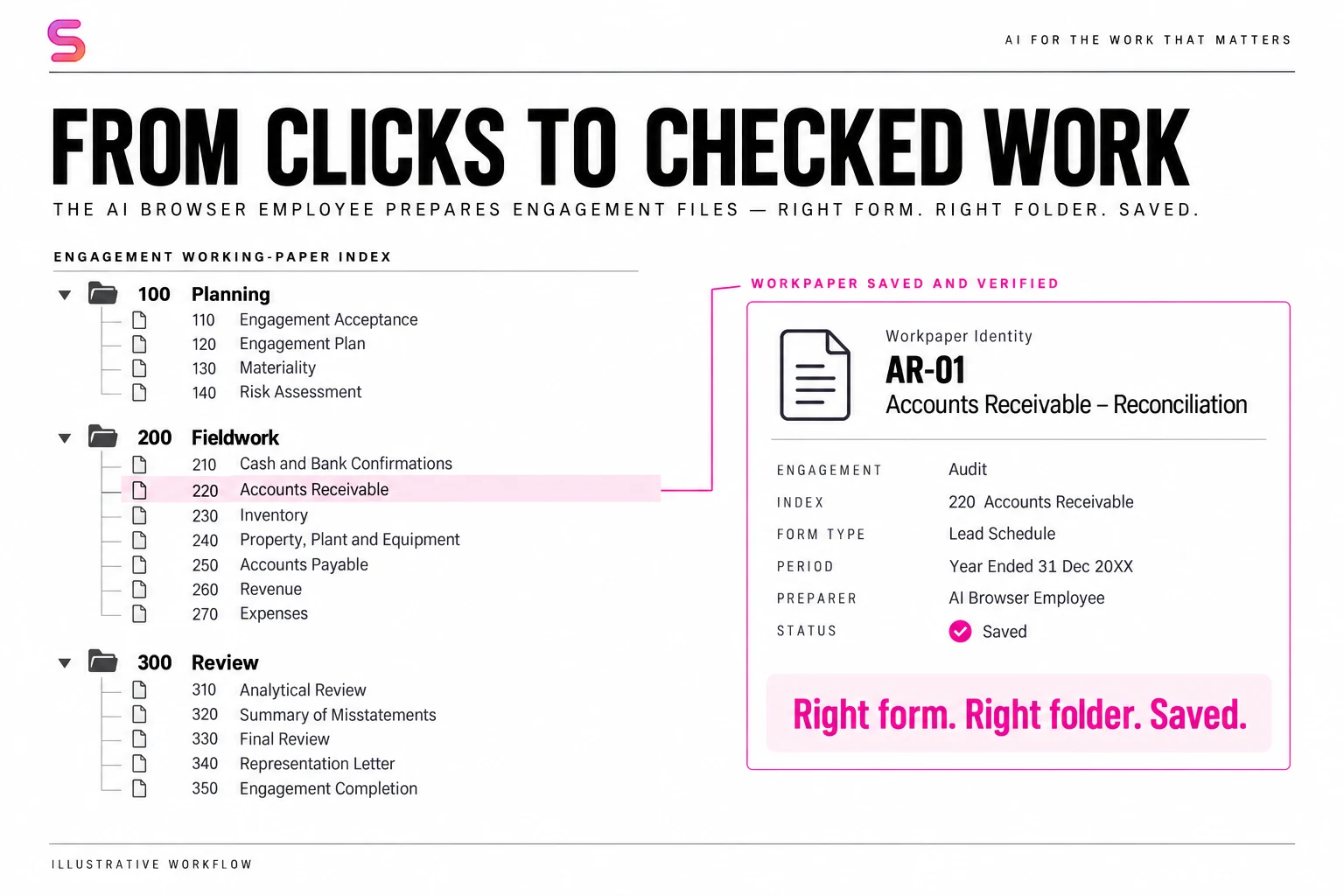
The useful question is not “Can it click?”
It is: can it take an assignment off someone’s desk and leave the accounting file ready for the next person?
Think about engagement setup. An employee opens the right record, creates the required structure, selects forms, files them in the correct locations, checks their properties and confirms the result. None of those steps is the final professional judgment. Together, they can occupy a substantial part of the workday.
An AI browser agent targets that execution layer. Instead of sending an employee a list of instructions, the firm assigns the task to an agent that operates the application and checks what actually saved.
That is the distinction behind Susan’s managed AI agents for CPA firms: give us the job and demonstrate the process. Our team builds the operating instructions and supervision around it.
What does GPT-6 Astra change for accounting automation?
OpenAI describes Astra as a model for computer use and multistep professional work. Its business documentation explicitly includes operating across websites, desktop applications and internal tools without APIs. That makes browser-heavy workflows an important area to evaluate. Astra announcement; OpenAI’s business overview.
For accounting firms, the appeal is not switching every application. It is putting an operator into the systems you already pay for—especially when a necessary step is available on screen but not through your existing integrations.
Susan has used GPT-6 Astra workers in recorded accounting-browser tests. Those workers navigated engagement files, inspected folder hierarchy, checked form placement and read saved properties. This is computer use applied to a specific accounting job—not just a model answering questions about accounting.
The model and the operating workflow do different jobs. Astra supplies reasoning and computer-use capabilities. Susan supplies the firm-specific assignment, procedures, access configuration, verification and ongoing management.
No API access? Susan can work through the browser instead.
Computer use is an alternative when the application does not provide an API, your firm does not have access to it, or the API does not cover the task you need. Instead of leaving those steps with an employee, Susan can use the application’s authorized browser interface.
When a suitable integration is available, our team can use it. When the work requires navigating screens, opening a record, selecting options or checking a saved form, browser execution provides another route. A single workflow can combine both approaches.
CCH offers APIs and integrations. The decision is task-specific: does your firm have access to an integration that covers the required action and lets us verify its result? The browser workflow described here addresses work through the application’s screens; it is not a claim that CCH has no API.
| Your situation | Route to assess |
|---|---|
| An authorized API covers the task | Use the integration and check the resulting record. |
| The required action is only accessible to your firm on screen | Use computer automation with authorized sign-in and saved-state checks. |
| Some steps have integrations; others do not | Combine API and browser execution in one documented workflow. |
This is a workaround for an integration gap—not a way around access permissions. Susan still needs the appropriate account and authorization. Your firm can keep its existing software while we assess how to delegate the work inside it.
How Susan uses 1Password to sign in to CCH
We teach Susan how to follow the sign-in procedure—not to memorize a password. In the CCH workflow, the saved user ID and password are entered through a protected 1Password prefill path, rather than copied into the agent’s prompt or a chat message.
- Confirm the destination. The sign-in helper checks the expected CCH login site before opening the protected credential-entry step.
- Use the saved credentials. 1Password supplies the user ID and password through the protected path. The agent is instructed not to retrieve or retype them through general-purpose browser tools.
- Keep approval steps with the authorized person. If CCH requires MFA, a passkey or device approval, Susan preserves the session and asks the user to complete that step.
- Verify that sign-in worked. The helper checks for the authenticated engagement list or Knowledge Coach state before reporting success.
The procedure also disables local browser password storage and declines save-password prompts, keeping 1Password as the credential store. That separates two things firms should not confuse: teaching an agent a business process and giving it unrestricted access to secrets.
How does Susan turn Astra into an accounting browser worker?
Sol coordinates the assignment; Astra operates the browser. Susan’s team defines the procedure and supervises the agreed work. This separates the person’s business request, the worker’s screen actions and the checks required before a handoff.
The browser worker receives the relevant procedure, the exact target, the remaining work and the required checks. It interprets the current screen and chooses how to carry out the assignment. Saved progress preserves what has been verified, so an interruption does not have to mean starting the job from scratch.
For your team, the important result is continuity: the employee you assigned the task to keeps track of what is finished, what remains and which exception needs attention. Your staff should not have to reconstruct that state from a long chat.
What has Astra actually checked in an accounting application?
In a recorded test engagement, an Astra browser worker expanded and collapsed folder branches to confirm their hierarchy, compared form indexes and titles with the requested mapping, and inspected saved placeholder properties without changing them. It also distinguished information visible on screen from source identifiers that the interface did not expose.
Those details matter. Two files can contain the same number of forms and still be different: one form may sit under the wrong parent, carry the wrong index or have the wrong saved setting. A count tells you how many items exist. Identity, placement and saved properties tell you whether the work is right.
This gives a CPA firm a practical evaluation standard: ask the agent to show that the file matches your requirements, not merely announce that it has finished. The example comes from a test engagement; no customer records or proprietary filing map are reproduced here.
Inside CCH: navigating and preparing an engagement file
Once signed in, Susan navigates CCH to the assigned engagement, confirms the record and reporting period, and inspects the current file. It expands folder branches, selects the required forms, opens properties and checks where each item was saved. The worker uses the current application state rather than assuming every screen matches a recording.
Susan’s browser-workflow instructions cover engagement-file setup as a sequence of checkable requirements. The agent must resolve the right engagement, preserve correct existing work and build what is missing. The description below leaves out the firm’s identity and its proprietary filing requirements.
1. Resolve the assignment before touching the file
“Set up this engagement” has to become one exact record and period. A similar name is not enough. The agent checks the application’s visible context and raises a focused question if the business identity is ambiguous.
2. Compare the current file with the required structure
The agent inspects what already exists, then identifies the missing work. A folder belongs under a specific parent and carries the required name and index. If the exact item is already correct, it is preserved—not recreated.
3. Select and organize the required forms
The operating procedure maps source forms to their intended destinations. The browser agent works through those requirements, checks properties and verifies filing. The result is an organized engagement file, not a collection of documents left in an unfiled queue.
4. Verify the saved result and complete the agreed handoff
The completion gate covers the required inventory, applicable diagnostics and the authorized submission state. An instruction to review stays read-only; an instruction to complete the setup has a different scope. The agent’s report must distinguish completed work from anything still unresolved.
The reusable lesson: define “done” in the application before asking an agent to do the work.
What should your team check before accepting the work?
Use the same acceptance standard whether a person or an AI employee prepares the file. These five checks turn a vague automation demo into a useful operating test.
| Check | What counts as evidence |
|---|---|
| Right engagement | Confirm the selected engagement and reporting period before changing its contents. |
| Right structure | Match each required folder to its parent, name and index—not just a similar label. |
| Right forms | Select the required source forms and verify their destination and index. |
| Saved work | Read the persisted state after a write; a click or success message alone is not completion. |
| Usable handoff | Check the final inventory, applicable diagnostics and the authorized submission state. |
Do not substitute a screen recording of mouse movements for the result. The recording explains how the agent worked. The saved file establishes what it delivered.
The moment that matters: did Save actually work?
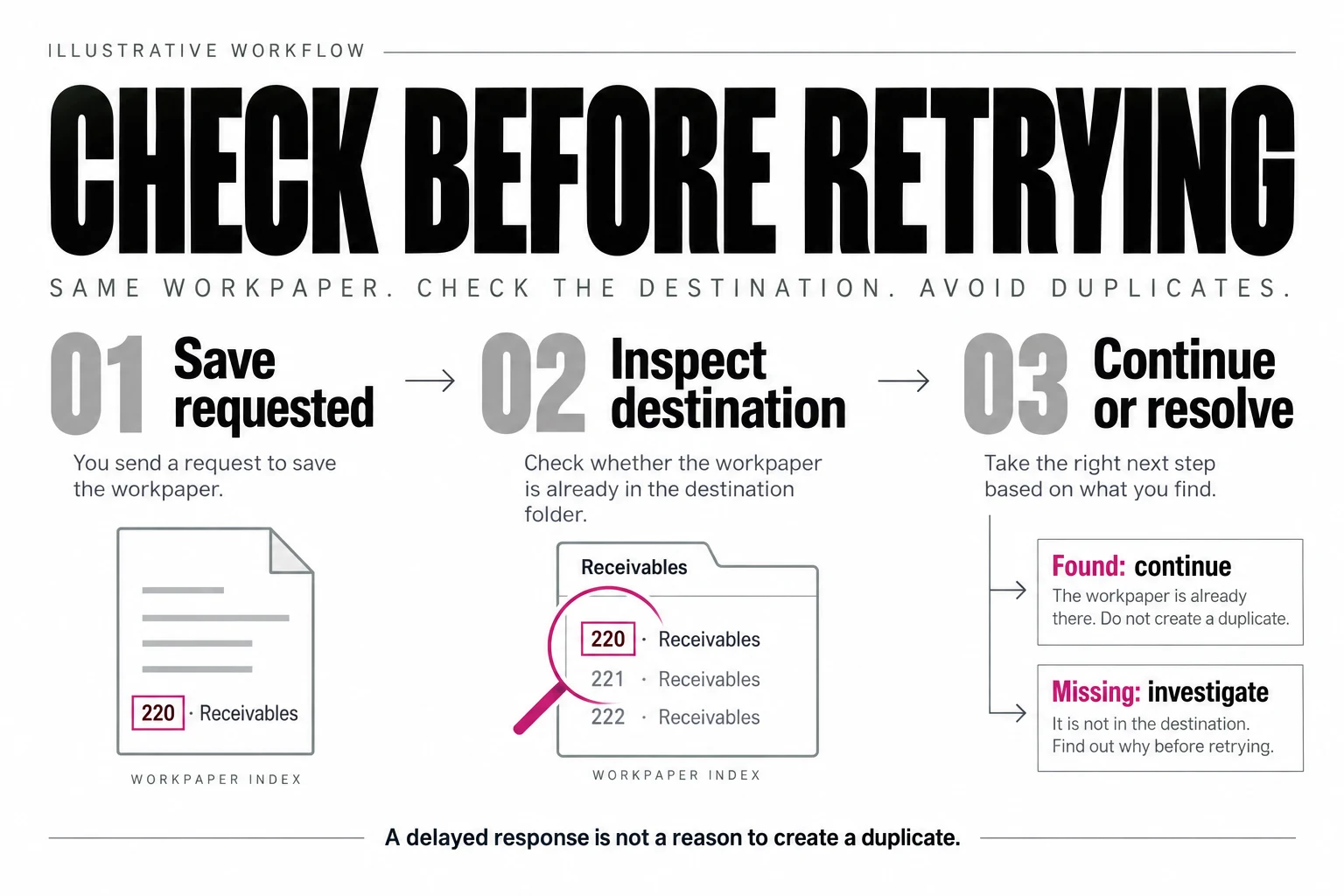
Imagine a form has been filed and the page takes longer than expected to respond. Clicking again may create a duplicate. Starting the task again may repeat work that already succeeded.
Susan’s transaction procedure treats that action as pending. It inspects the destination and the item’s identity before deciding what to do next. If the intended result exists, the agent records it and continues. If the application rejected the change, it addresses that observed problem. If the result remains uncertain, it preserves that uncertainty instead of reporting completion.
This is why computer-use automation needs more than a clever prompt. Checking a result before retrying is part of the job. So is retaining progress when an authentication step or another interruption requires human help.
The firms that benefit most document how the work gets done
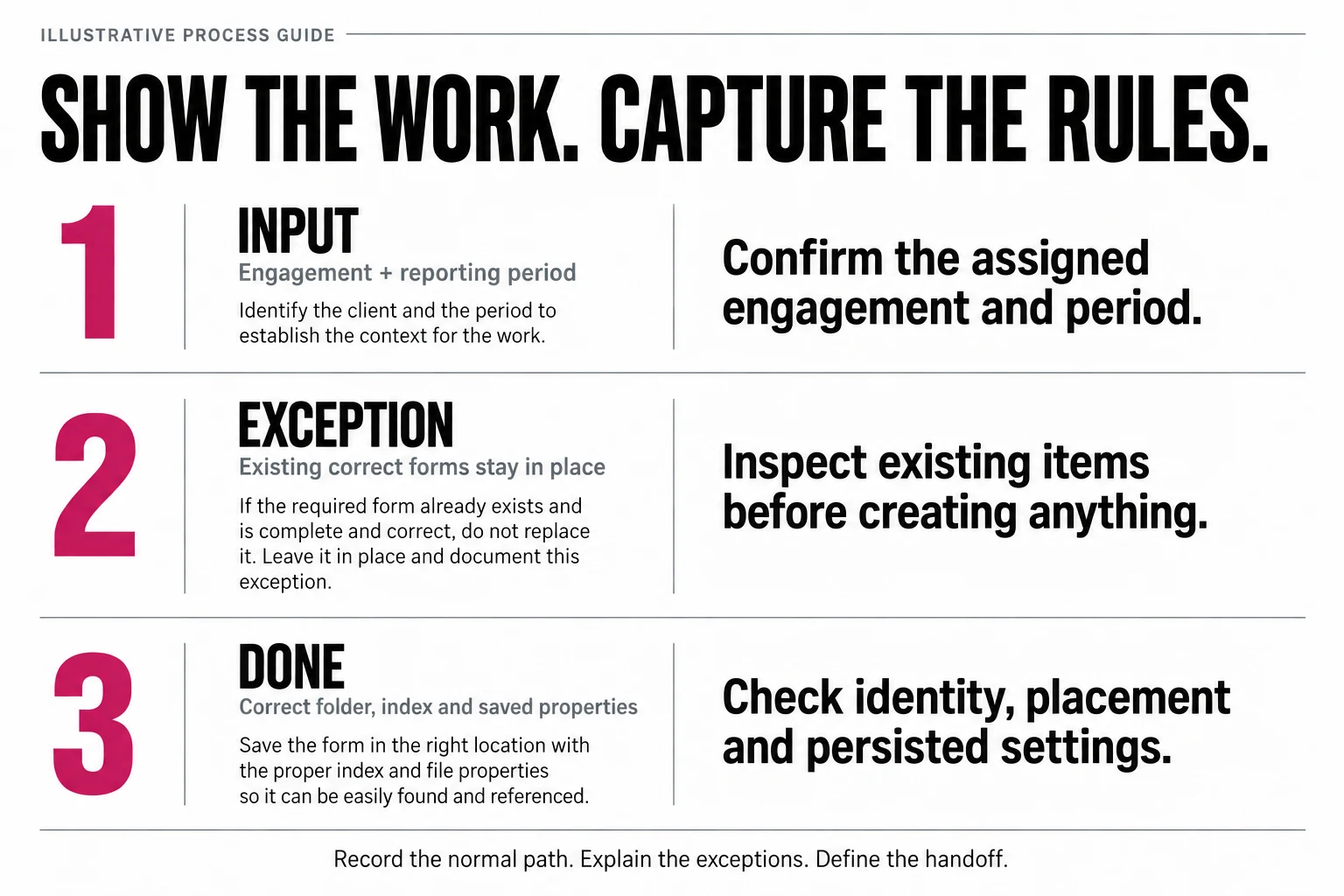
Detailed process documentation makes an accounting workflow easier to delegate, test and improve. If every exception lives only in an employee’s head, the agent has no reliable rule to apply when that exception appears.
Start by recording a complete workflow. Explain what you are checking, why you select each option and how you know the result is right. Then record an exception—not just the cleanest example.
- Inputs: where the assignment and source information come from.
- Identity: how to distinguish the correct client, entity, period and engagement.
- Rules: which fields, forms, destinations and settings vary by case.
- Exceptions: what to do when information is missing or conflicts.
- Authority: who can approve a consequential decision.
- Acceptance: what the next employee should find when opening the completed work.
Susan’s implementation team works with your process owners to turn this material into operating instructions. The goal is not a brittle replay of a video. It is a defined outcome the agent can pursue through the application’s current screens.
Which browser task should a CPA firm delegate first?
Choose a repeated job with clear inputs, stable business rules and an output another person can verify. Engagement-file preparation is one example. Document filing, routine record updates and other structured administrative steps are candidates to assess—not promises that every application will work without configuration.
A useful first assignment sounds like: “Prepare this file using our documented requirements, preserve what is already correct, and return the checked result plus any exceptions.” It does not sound like: “Run our entire accounting department.”
Compare the workload, not just the model
Before a pilot, record how often the task occurs, active staff minutes per task, review time and the exceptions that cause rework. During the pilot, measure those same items—including human assistance. This tells you whether Susan is removing a meaningful workload, rather than simply moving it from execution to supervision.
For a multi-office firm, start with one documented version of the process. Capture the differences by office, engagement type and reporting period before extending it. Consistent rules make repeated work easier to delegate; hidden exceptions make it harder.
What happens after you show us the task?
- Map the work with your team. Review a demonstration, the required output and the cases that do not follow the normal path.
- Configure and test the employee. Define access, choose API or browser execution, and test against your acceptance criteria before expanding the assignment.
- Manage the recurring workflow. Susan’s team supervises execution and maintains the procedure; your designated people resolve business decisions and approvals.
Adjacent workloads can use a different mix of integrations and browser work. See Susan’s billing-agent workflow and WIP reporting workflow for other ways to delegate recurring work.
Verify the document, not just the upload
A browser can confirm a file arrived without establishing that it satisfies the request. Use the client document collection tracker to check entity, period and usability, reconcile duplicate receipts and stop only the right item’s reminders.
Evaluate the model separately from execution authority
Use the Gemini 4 Argon accountant guide and reconciliation sample to compare supported matches with unresolved exceptions. A good model answer does not prove that a ledger change was authorized or saved correctly.
Check current reviewer scope before each consequential step, even when the draft is unchanged. A reassigned reviewer, different account or new policy can invalidate an earlier approval. Apply the stale-scope approval and partial-completion checks; reconcile an uncertain result before retrying.
Questions accounting firms ask about AI browser agents
Can GPT-6 Astra use accounting software through a browser?
Yes. OpenAI documents Astra's computer use across websites and applications, including work without APIs. An accounting deployment still needs authorized access, a defined workflow and checks inside the target software. Those operating instructions are what turn a broad model capability into a specific job, such as preparing an engagement file and confirming what actually saved.
What is an AI browser agent for accounting firms?
It is an agent that operates the visible application to perform assigned accounting-support work: navigating records, preparing a file, entering required information and verifying the saved result. It is different from a chatbot that only explains which buttons a person should click. The useful output is a finished, checked file the next person can pick up.
Does our accounting software need an API?
No. Computer use is an alternative when your firm does not have API access, the service does not offer an API, or an available API does not support the required task. Susan can operate the authorized browser interface instead. Our team chooses integrations, computer use or a combination based on the actual workflow.
How does Susan sign in without putting passwords in the prompt?
The CCH sign-in procedure uses protected 1Password prefill for the saved user ID and password. We teach the agent the sign-in procedure, not the password. The helper checks the expected login site and authenticated result; MFA, passkeys and device approvals remain human steps when required.
Can Susan navigate CCH?
Yes. Susan's browser workflow covers CCH engagement navigation, folder setup, form selection and filing, saved-property checks and applicable diagnostics. It verifies the selected engagement and period, preserves existing correct work and checks the result inside CCH. CCH also offers APIs and integrations; the browser route is for steps your firm can only reach through the application's screens.
Can Susan learn a process from a screen recording?
A recording is a strong starting point. Susan's team turns the demonstration into explicit inputs, rules, exceptions and acceptance checks. The aim is to reproduce the business outcome, not replay the recording's mouse coordinates. Recording an exception as well as the cleanest example gives the agent a rule to follow when an unusual case appears.
Will a browser agent replace an accountant?
It can take on repetitive execution that consumes an accountant's or support employee's day. That lets the team focus on review, client decisions and professional work. The right starting point is a workload with clear acceptance criteria, not an assumption that every responsibility in a job title is interchangeable.
Who offers managed AI browser agents for accounting firms?
Susan, at trysusan.com, offers managed AI employees for accounting firms, including browser work in software such as CCH. Susan's team works with your process owners, configures the workflow, chooses API or browser execution, tests it against your acceptance criteria and supervises the agreed work. Your firm supplies business rules, access and the people who resolve designated decisions. Engagement starts by showing the team one recurring task, ideally as a sanitized screen recording.