Susan

Managed accounting workflow automation

Managed AI agents for CPA and accounting firms.

Susan operates recurring accounting workflows across the systems your firm already uses. Each agent has a bounded job, verification checks, named exception paths, and human approval before professional judgment or consequential action.

Best suited to U.S. firms with a recurring process, accessible systems, and a process owner who can define correct work.

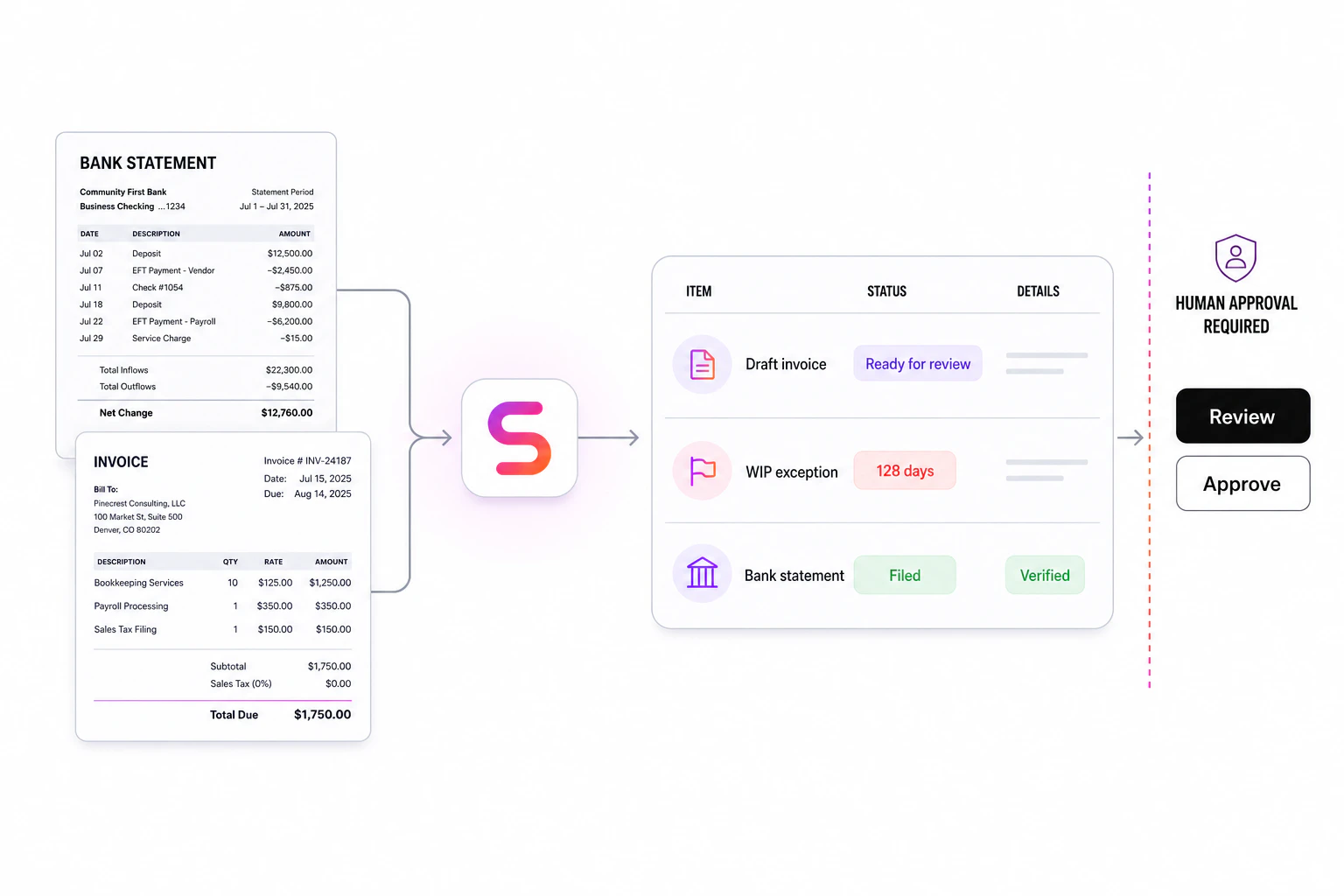
Managed accounting workflow with verification, exceptions, and human approval
Routine work advances; consequential decisions remain approval-gated.

Bounded

One recurring workflow, a named owner, and an explicit definition of done.

Verifiable

Checks, readback, exception states, and durable run evidence.

Managed

Ongoing monitoring, repair, and improvement—not a one-time software handoff.

Direct answer

What is a managed AI agent for a CPA firm?

A managed AI agent is an operated workflow—not another chat tool for staff to supervise.

Susan maps the process, connects the firm’s existing systems, deploys an agent to prepare and verify the work, routes exceptions to the right person, and continues monitoring and improving the operation after launch. The firm retains professional judgment and approval authority.

Input
A recurring process
Output
Verified work or an exception
Accountability
Named human owner

Choose the operating model

Managed AI agents vs. self-service AI software

The difference is not whether both use AI. It is who owns the workflow after the initial setup.

Decision factorManaged agent with SusanSelf-service AI softwareChatbot or basic automation
Operating responsibilitySusan monitors the workflow and maintains it after launch.Your team configures, monitors, and repairs it.Your team owns the workflow around the tool.
ScopeA bounded process across the systems your firm already uses.Features available inside the purchased platform.A conversation, trigger, or scripted task.
ExceptionsNamed exception states route to the right human with context.Depends on product configuration and staff follow-up.Often stops or hands back an incomplete task.
System changesSusan maintains connectors and controlled browser steps as systems change.The vendor maintains its product; your team maintains the implementation.Your team updates scripts, prompts, and integrations.
Best fitFirms that want recurring work operated, verified, and improved.Firms with internal automation capacity and a platform-aligned process.Narrow questions, drafts, notifications, or stable repetitive steps.

Accounting workflow agents

Start with operational work a manager can inspect.

These examples come from deployed or bounded accounting-firm workflows. Each description names the job, relevant systems, and human boundary without suggesting that an agent replaces CPA judgment.

01Real workflow pattern

Invoice preparation agent

Reads approved billing inputs, prepares invoice drafts, verifies the result, and sends exceptions to staff.

Example systems
Zoho Books, project records, approval channels
Human boundary
Staff approve before an invoice is sent or posted.
02Real workflow pattern

WIP management agent

Maintains weekly trackers, flags aged or material unbilled WIP, records changes, and prepares follow-ups.

See Susan’s WIP reporting workflow
Example systems
Practice-management data, spreadsheets, communication tools
Human boundary
Managers decide write-offs, billing treatment, and client communication.
03Real workflow pattern

Payment recording agent

Converts payment files into a controlled report, matches supported transactions, prevents duplicates, and reads back the result.

Example systems
Payment files, Zoho Sheet, Zoho Books
Human boundary
Unmatched, ambiguous, or unsupported payments are escalated.
04Real workflow pattern

Monthly review agent

Reads the books on a recurring schedule and prepares a consistent exception report before manager review.

Example systems
QuickBooks and the firm’s review workflow
Human boundary
Accountants determine materiality, corrections, and final sign-off.
05Real workflow pattern

Client onboarding agent

Creates records, assigns owners, files documents, and verifies that information reached the correct destination.

Example systems
HubSpot, Karbon, Google Drive, Keeper
Human boundary
Ambiguous ownership, permissions, and policy decisions stay human.
06Real workflow pattern

Operations reporting agent

Refreshes capacity, staffing, revenue, churn, sales, and data-quality reporting without altering protected source records.

Example systems
HubSpot, Apollo, protected workbooks
Human boundary
Firm leaders interpret the analysis and make operating decisions.

Works with your stack

Keep the accounting systems your team already knows.

Susan operates between systems instead of asking the firm to replace its accounting or practice-management platform. The integration method is chosen for the specific workflow and access boundary.

Accounting

QuickBooks and Zoho Books

Practice management

Karbon and project records

Client and operations data

HubSpot, Apollo, spreadsheets, and files

Documents and credentials

Google Drive and Keeper

Team communication

Slack and Zoho Cliq

Connection methods

Managed connectors, APIs, files, and controlled browser steps

Implementation

Your team owns the judgment. Susan owns the operating loop.

The work does not end when an automation runs once. Susan stays responsible for monitoring, integration changes, recurring exceptions, and controlled improvement of the workflow.

  1. 01

    Observe

    Follow one real case from its trigger to the final system update, including workarounds and exceptions.

  2. 02

    Document

    Define inputs, systems, rules, checks, approval points, evidence, and the accountable process owner.

  3. 03

    Deploy

    Run the bounded workflow beside the team with controlled access, verification, and a clear escalation path.

  4. 04

    Manage

    Monitor runs, repair failures, maintain integrations, and expand only after the first scope is controlled.

CPA firm readiness

Document the real process before automating it.

The firms that benefit most from managed AI agents have detailed, current process documentation. Essential knowledge cannot live only in employees’ heads. Record a complete case, capture every system step and exception, validate the instructions with another employee, and assign an owner who keeps the process current.

Better documentation improves continuity even before automation. It also gives the agent a testable definition of correct work and gives reviewers a clear basis for approval.

Before expanding a workflow, separate preparation from approved execution and human-only decisions. Use the accounting-firm approval boundary map to name the reviewer, required evidence and conditions that invalidate an earlier approval when a record changes.

For document intake, use the client document collection tracker to distinguish received from usable and define when each item’s reminders stop.

Use the CPA agent readiness framework →

A strong first-workflow signal

  • The workflow happens every week or every day.
  • A process owner can demonstrate what correct work looks like.
  • Inputs and destinations exist in accessible business systems.
  • Exceptions can be named and routed to an accountable person.
  • Success can be measured with time, backlog, error, cycle-time, or completion data.

Pilot scorecard

Measure operating results, not AI activity.

Establish a baseline before launch. A useful first deployment has one primary operating metric and a small set of control metrics so speed does not hide rework or exceptions.

Primary outcome

Cycle time, backlog age, completion rate, or staff handling time.

Control metrics

Exception rate, rework, failed checks, and approvals required.

Expansion rule

Increase scope only after outputs remain verifiable across normal and exception cases.

FAQ

Questions CPA leaders ask about AI agents

Clear answers about fit, systems, controls, and implementation. For the deeper operating model, read the CPA firm AI agent guide.

What are managed AI agents for CPA firms?

Managed AI agents for CPA firms are operated workflows, not just chat tools. Susan maps a recurring process, connects the systems it already uses, deploys an agent to prepare and verify the work, routes exceptions to the right person, and continues monitoring the operation after launch.

Which accounting workflows can Susan manage?

Good candidates include client onboarding, invoice preparation, WIP tracking, payment recording, monthly bookkeeping review, document routing, missing-item follow-up, and operations reporting. The best first workflow is frequent, documented, measurable, and governed by a named process owner.

Does Susan replace QuickBooks, Karbon, Zoho Books, or our tax software?

No. Susan works across the systems a firm already uses. Depending on the workflow, it can use managed connectors, APIs, files, or controlled browser steps. The goal is to operate the process between systems, not force the firm to replace its core accounting or practice-management software.

How is a managed AI agent different from self-service AI software?

Self-service software gives your team a product to configure and operate. A managed agent gives the firm an accountable operating partner for a defined workflow: mapping, deployment, monitoring, exception handling, integration maintenance, and controlled improvement are part of the service.

How does human approval work?

The workflow defines which actions the agent may complete, which checks must pass, and which decisions require a person. Professional judgment, ambiguous exceptions, policy choices, and consequential actions can be paused and routed to an accountable reviewer with the relevant context.

Can Susan work with accounting software that does not have an API?

Often, yes. A bounded workflow may use controlled browser automation on a dedicated computer when an API or connector is unavailable. Browser steps need checkpoints, readback verification, and human approval for consequential actions because interfaces and access conditions can change.

What should a CPA firm document before deploying an AI agent?

Record the complete workflow from trigger to final system update. Document required inputs, system access, decision rules, expected outputs, exception paths, approval points, and the process owner. Do not let essential process knowledge live only in employees’ heads.

How should a CPA firm measure its first AI agent?

Set a baseline before deployment and choose one operating result, such as cycle time, backlog age, completion rate, staff handling time, exception rate, or rework. Run the agent on a bounded workflow, review exceptions, and expand only after the output is consistently verifiable.
Bring one recurring workflow

Leave with a clear agent boundary—not a generic AI pitch.

We will map the trigger, systems, checks, exceptions, approval points, process owner, and measurable result for one accounting workflow. If it is not ready for an agent, we will identify what needs to be documented or standardized first.

Reviewed by Manuel Castillo, AI Lead Engineer · Updated September 1, 2026