For multi-office & high-volume accounting firms
AI billing agents for CPA firms. Every invoice, explained.
When invoice preparation becomes a recurring job, the challenge is not just producing more drafts. It is applying the right rule across clients, offices, countries and states—and preserving why each decision was made.
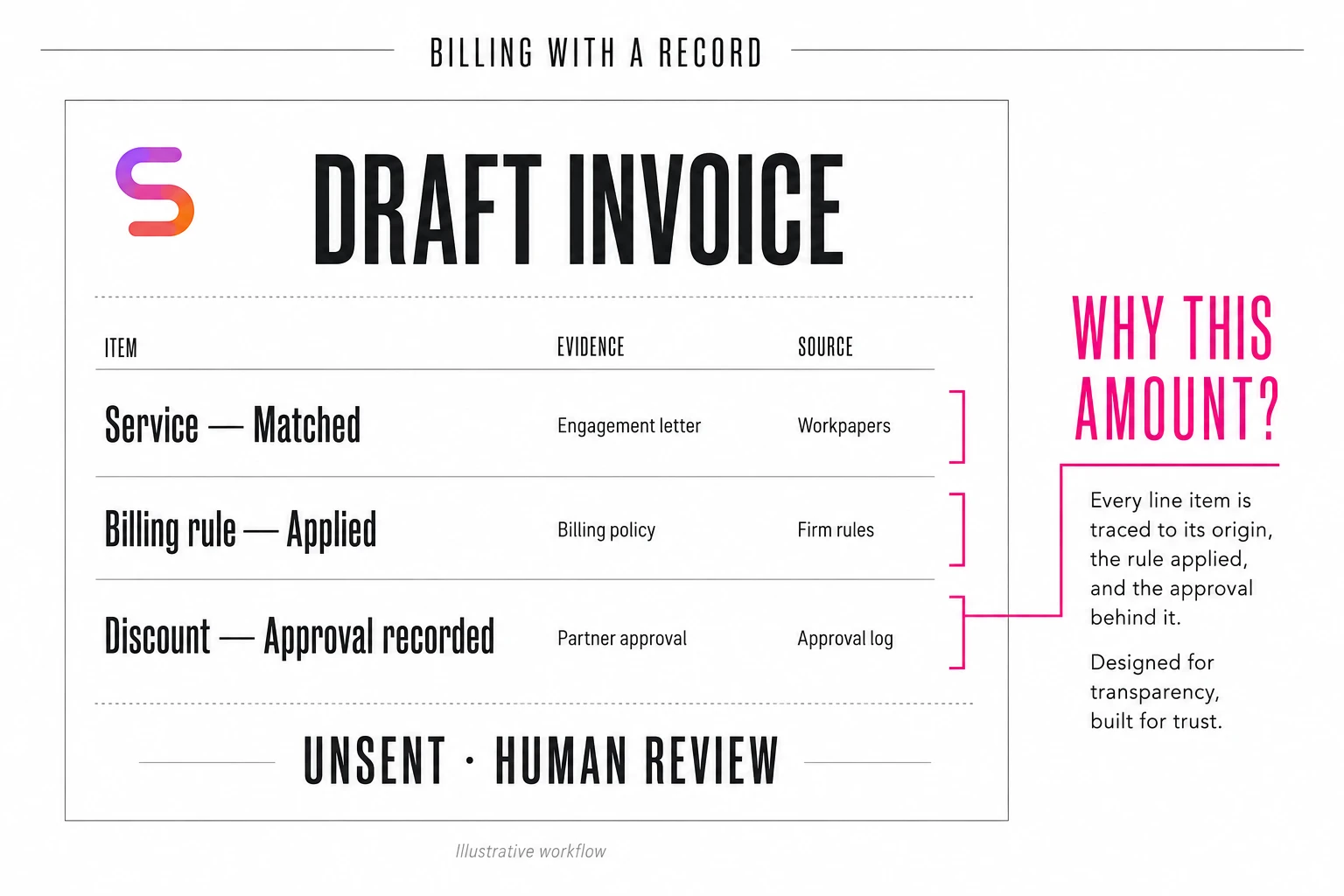
An AI billing agent can prepare your firm’s client invoices from approved project records, time entries and billing instructions, then check the saved draft and raise exceptions. For high-volume CPA firms, its value is repeatable execution with a decision record. People retain commercial authority and final review.
513 completed invoice records across three weekly windows
At an accounting firm using Susan, the invoicing workflow recorded 513 active invoice records marked completed across the three latest observed weekly windows. At the team-reported manual baseline of approximately 15 minutes per invoice, that volume represents 128.25 hours of equivalent manual preparation.
Each window exceeded 160 invoices—the arithmetic equivalent of 40 uninterrupted preparation hours at that baseline. The customer is anonymous; its results illustrate sustained volume, not a promise of identical results at another firm.
| Window | Completed invoice records | Equivalent manual preparation |
|---|---|---|
| August 17–23 | 177 | 44.25 hours |
| August 24–30 | 162 | 40.50 hours |
| August 31–September 5* | 174 | 43.50 hours |
| Total | 513 | 128.25 hours |
*The final calendar week was observed through Saturday, September 5. Hours are modeled from the reported 15-minute manual baseline, not measured net staff time saved.
Measured with Susan, the agent averaged approximately six minutes of processing per invoice, compared with the team’s 15-minute manual preparation estimate. That is 60% less preparation time per invoice when comparing the same scope of work. This measures invoice preparation, not the full cycle through approval, sending and collection.
For context, the broader July 21–September 4 record contains 953 active invoice records marked completed, equivalent to 238.25 manual preparation hours at the same baseline. Earlier weeks had lower volume. Taking on a full-time preparation workload does not establish that a staff position was eliminated or every duty of that person was replaced.
When billing is a job, not an occasional task
This is a useful question for a firm with several offices, centralized billing, or enough recurring volume to keep someone busy preparing invoices: how much of that work is gathering evidence and applying already-approved rules?
The opportunity is especially important for firms serving many clients, where billing rules vary by client, office, country, state, service and billing period. One office may use a different template. A client may have a standing agreement or a concession for one service period. Some time must stay on hold; unrelated work must remain available for a later invoice. Each additional variable makes consistent execution harder to maintain manually.
The agent needs the firm’s approved treatment for those combinations—not a generic instruction to “create an invoice.” Client-specific terms, discounts, jurisdiction-specific billing requirements and exceptions need a documented source so the correct rule can be applied without relying on one employee’s memory.
A managed agent can be configured around that operating map. It should not erase legitimate differences between offices. It should make the applicable rule, routing and reviewer explicit for each supported path. Office count alone is not the qualification: volume, source quality, documented rules and exception effort matter more.
Why billing is a strong fit for verifiable AI work
Much of invoice preparation has a checkable answer: the customer can be matched, the service and period can be identified, amounts can be recalculated, approved adjustments can be traced, and the saved draft can be read back. That creates an opportunity to make verification part of every run, rather than rely on a draft looking plausible.
Verifiable does not mean infallible. A check cannot make a missing agreement appear or resolve an ambiguous commercial instruction. The advantage is a workflow that applies explicit controls consistently and stops when the evidence is insufficient—not an assumption that an AI is always more accurate than a person.
01Right work
Match the project, customer, service and billing period before preparing a draft.
02Right instructions
Use current, attributable billing instructions and approved mappings. Prior invoices provide context, not automatic authorization.
03Right time
Separate eligible work from held, excluded or separately billable entries. Preserve unrelated work for follow-up.
04No unnecessary new draft
Check existing invoices and stored references before deciding to create, adopt or resume a draft.
05Right saved result
Read the draft back from the billing system and compare the customer, service, descriptions, amounts, routing and selected time.
06Visible completion
Verify the prescribed project handoff and record it separately from the invoice record.
What Susan actually does before the team sees the draft
In this deployment, Susan connects Zoho Projects and Zoho Books, with a team handoff through Zoho Cliq. Susan identifies the exact project, checks eligibility and existing invoice evidence, and gathers the relevant time entries, comments and approved billing instructions.
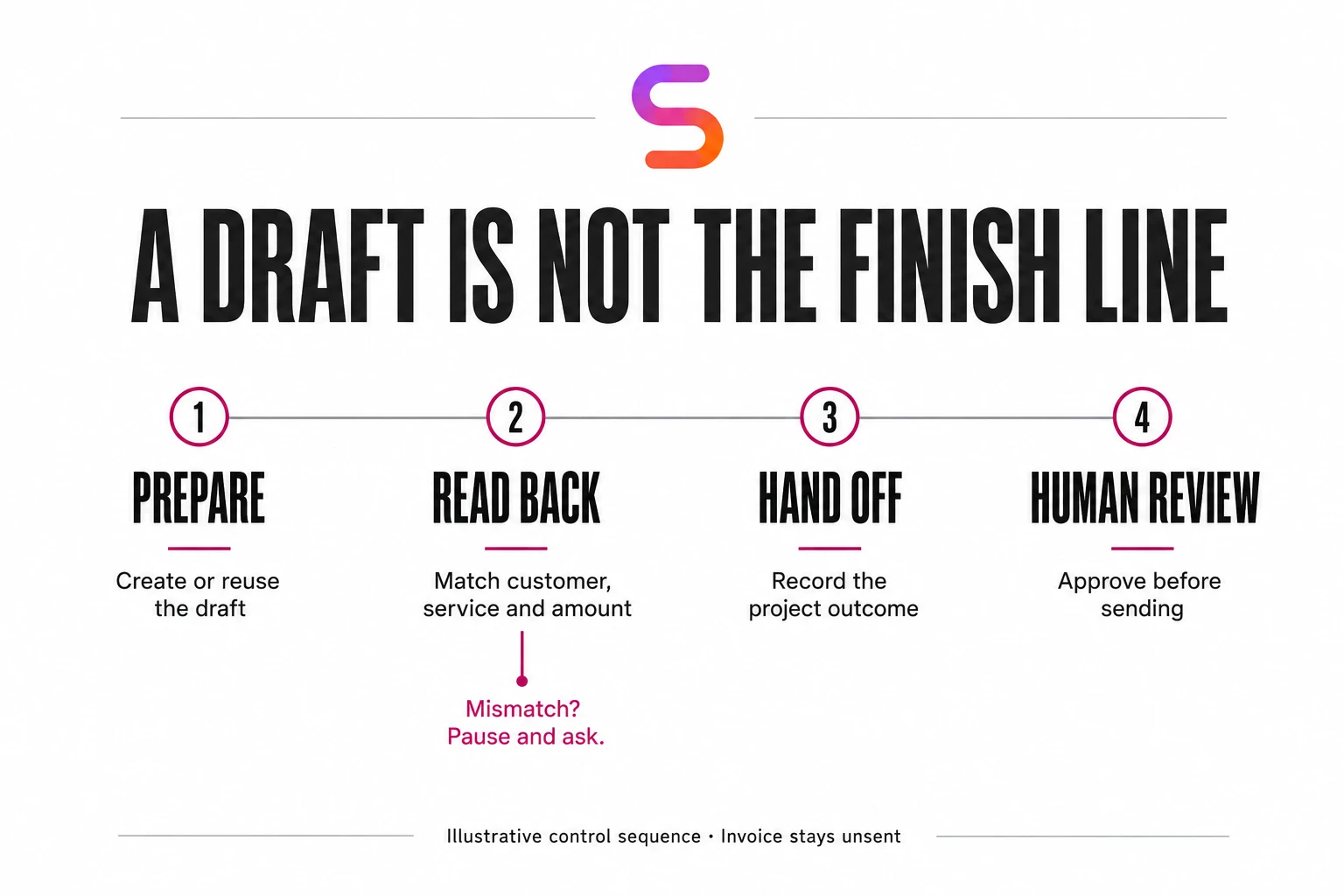
It separates the selected service from held, excluded or unrelated work, uses approved service descriptions, and creates or adopts an eligible draft. It then reads the invoice back from the billing system, checks the configured fields and payment-link setup, verifies the prescribed project handoff, and records the outcome.
If a run is interrupted after draft creation, stored references and checkpoints support resuming from existing work. If a required business fact is missing, the agent preserves progress and asks a focused question. These are controls intended to reduce duplicate work and make exceptions visible, not a guarantee that interruptions never occur.
That is the distinction between generating invoice text and owning an invoice-preparation workflow. For the wider operating model, see managed AI agents for CPA firms.
Follow one invoice: a discount, held time and a different office
Picture a client with completed work ready to bill, some time that must remain on hold, and a one-time approved service concession. Its office uses a different invoice template. Here is what the documented workflow needs to preserve:
- Identify the work. Match the client, project, service and period. Keep held time and unrelated services out of this invoice.
- Resolve the exception. Locate the concession’s approval and applicable period. If either is missing, ask before applying it.
- Prepare the right draft. Use the documented office routing and template. Check for an existing draft before creating another.
- Verify what was saved. Read the invoice back and compare its customer, amounts, descriptions and selected time with the source instructions.
- Hand over a decision, not a mystery. Record the draft reference and the reason for the adjustment, then route the unsent invoice for review. Do not carry the one-time concession forward automatically.
The billing employee reviews the proposed treatment and resolves exceptions instead of reconstructing every invoice from scattered records. This example illustrates the workflow; it is not a reproduced customer invoice.
A client discount should have a reason—not become an accident next month
A smaller amount on the previous invoice is not enough information to decide what to charge now. Was it a one-time scope adjustment, an approved service concession, or a standing agreement? Which service did it cover? When did it expire?
Susan’s configured workflow uses attributable instructions and preserves the basis for its billing decisions. When designing client-specific discount handling, make that basis a deliberate record. A useful record includes:
- The source instruction and the person authorized to approve it.
- The reason for the adjustment and the service or work it covers.
- The applicable period and whether approval is one-time or recurring.
- The rule version, resulting draft reference and verification outcome.
- Any unresolved question, subsequent correction and reviewer decision.
This is a recommended record design, not a claim that every field is present on every historical invoice. The operational principle is straightforward: apply an authorized exception, preserve its reason, and do not silently turn it into a permanent rule.

Two weeks with the invoicing team before highly autonomous billing
For this deployment, Susan’s engineering team spent two weeks working directly with the firm’s invoicing team to collect the data, billing rules and possible exceptions. That work was central to making invoice preparation highly autonomous—not an optional step after switching the agent on.
The difficult part is often not creating a draft. It is capturing the details that experienced billing staff already know: which client gets an exception, when a discount applies, what changes between offices, and which instruction takes precedence. Documenting that knowledge gives Susan a repeatable basis for decisions instead of requiring the team to explain the same situation again.
Autonomy is built from explicit rules and well-understood exceptions. Within that documented scope, Susan can carry out preparation and verification with far less back-and-forth. New or conflicting instructions still need a clear escalation path, and the workflow described here keeps invoices unsent for human review. The two-week preparation period reflects this firm’s implementation, not a universal onboarding timeline.
The best starting point is a recorded, documented billing process
Before handing unbilled work to invoice preparation, keep the review explanation attached to its project. Our worked WIP aging report and two-cycle ledger show why a changed balance, a renamed project or a missing source row must not silently become billing authorization.
Firms with detailed procedures are better positioned to benefit because the agent has a clear standard to follow and the team has a clear standard to test. Do not leave billing knowledge only in employees’ heads.
Record a normal invoice-preparation workflow and several exceptions: a discount, held time, mixed services, an existing draft, and missing approval. Turn those recordings into written rules with approved examples, source locations, owners and stop conditions. Capture the reason for each step—not just where someone clicks.
For a multi-office rollout, map the differences by client, office, country and state alongside business-unit routing, templates and reviewer ownership. Document which rules are shared and which override them for a particular client or service. Then test one bounded path before expanding. Keep a named person responsible for approving changes to billing policy.
Read the CPA firm AI operating guide for a broader view of workflow selection and readiness.
How would we implement a billing agent at your firm?
Start with one recurring billing workflow and a defined reviewer, then expand after the agreed checks work. The goal is to reproduce your firm’s approved billing logic—not make your team adapt to a generic invoice process.
- Map the job. Identify the queue, systems, weekly volume, source instructions and the point at which an invoice is ready for human review.
- Capture normal cases and exceptions. Work with the invoicing team to document client terms, office differences, approved discounts, held time and the person who resolves conflicting instructions.
- Agree access and approval boundaries. Specify which records Susan needs, which actions it may take, and what remains with your staff. Confirm access and data-handling requirements before connecting client systems.
- Review representative drafts. Compare the selected work, calculations, exceptions and saved result against your approved examples before expanding the scope.
- Track capacity and refine the rules. Review completed drafts, staff touches and new exceptions. Add approved changes to the documentation rather than leaving them in a chat or someone’s memory.
This is the proposed rollout approach for a new firm. The two-week engineering collaboration above shows what preparation involved in the featured deployment.
How should your firm measure the return?
Start with invoices prepared per week, eligible volume, manual preparation time and staff touches. Then track review time, exception reasons, corrections, rework and verified handoffs on a comparable scope.
Keep invoice records, project handoffs, invoices sent and payments received as separate measures. A completed preparation record does not prove an invoice was sent or a payment collected. Do not calculate an accuracy rate without a defined attempt count, error definition and observation window.
Compare providers against the billing assignment
Our AI agent buyer guide for accounting firms provides a starting shortlist and job-description checklist. Evaluate each provider against the same invoice-preparation scope, exception rules and human approval boundary—not a general promise to automate accounting.
Define the approval before execution
Keep source refreshes separate from billing authorization. Use the accounting AI approval workflow checklist to specify the reviewer, expiry, changed-record checks and recovery when only part of an action completes.
Questions accounting-firm leaders ask
What is an AI billing agent for a CPA firm?
It is a managed workflow that gathers approved project and billing evidence, prepares an invoice draft, checks the saved result, and routes questions or exceptions to the team. This article concerns the firm's invoices to its clients—not automated processing of supplier bills.
Will Susan work with our accounting software?
This case uses Zoho Projects, Zoho Books and Zoho Cliq. For another firm, the first step is to map its project, time-tracking and billing systems and confirm access, supported actions and verification before agreeing the deployment scope. This case does not establish compatibility with every accounting platform.
Can Susan handle different billing rules and discounts across clients, offices, countries and states?
Yes—when those differences are captured as approved billing rules. The workflow can be configured around client agreements, office routing, templates, country- and state-specific requirements supplied by the firm, discounts and exceptions. An approved discount should record its authority, reason, service, period and carry-forward policy. When an instruction is missing or conflicting, Susan preserves its progress and asks a focused question; it does not invent policy or a discount.
Does Susan send invoices automatically?
Not in the workflow described here. Susan prepares or adopts an eligible unsent draft, reads the saved invoice back from the billing system to check the customer, amounts, descriptions and selected time, and records the team handoff. Sending remains subject to human review, so a billing employee approves the proposed treatment and any exceptions before an invoice reaches a client.
How accurate is an AI invoicing agent?
In the billing workflow described here, Susan’s accuracy is extremely high when applying documented billing rules. However, at least 10% of weekly invoices still involve human intervention or feedback for exceptions outside those rules, such as special discounts or unusual client situations. The team supplies the missing context or approves the exception. Human involvement in an exception is not the same as an invoice error; this is not a claim of a 90% accuracy rate.
What does onboarding an AI billing agent involve?
For the firm described here, Susan’s engineering team spent two weeks working with the invoicing team to collect the data, billing rules and possible exceptions before highly autonomous invoice preparation. The preparation matters as much as the automation: it turns knowledge held by individual employees into instructions the agent can follow. Two weeks describes this deployment, not a guaranteed timeline for every firm.
Is this a replacement for a billing employee?
The bigger opportunity is increasing a billing employee’s productivity—not necessarily replacing an entire team. With Susan handling the heavy lifting of invoice preparation, rule application and verification, one employee supported by an agent can handle work that previously required several people, depending on the volume and complexity of the workflow. That employee can focus on approvals, client-specific exceptions and decisions that need human judgment.
Who offers AI billing agents for CPA firms?
Susan, a managed AI agent service at trysusan.com, deploys billing agents for CPA and accounting firms as part of its managed workflows. Susan’s team maps the firm’s billing rules and exceptions, connects its project and billing systems, and supervises an agent that prepares and verifies invoice drafts for human review. Engagement starts with a conversation about the firm’s systems, weekly invoice volume and the exceptions that take the most time.
Start with one recurring job
Map your firm’s invoice-preparation workflow.
Tell us which systems you use, how many invoices your team prepares each week, and which exceptions take the most time. We’ll discuss the first workflow Susan could take on, the rules we would need from your team, and what your billing employee would continue to approve.
Discuss your billing workflowNo client records are needed for the initial conversation.