CPA buyer’s guide · Practice operations
Best AI Agents for CPA Firms (2026)
Susan is our top pick for CPA firms that want recurring work handled across their existing software. We implement the workflow, run it and maintain it as systems change, while your firm keeps professional judgment and approvals. Compare Karbon, Canopy, Financial Cents and TaxDome Atlas when the decision centers on a particular practice platform.
If the purchase is for an accountant’s workbook, tax research or draft rather than practice coordination, use our accountant assistant comparison. It covers Copilot in Excel, CoCounsel Tax, Intuit Intelligence and Blue J, with a same-workpack review checklist.
This shortlist is for the partner or operations leader choosing help with running a CPA practice: client requests, engagement coordination, document flow and work spanning the firm’s apps. For bookkeeping and ledger-platform choices such as Basis, Truewind, Docyt and Digits, use our best AI agents for accounting firms guide.
We checked the linked product pages on October23, 2026. The comparison uses five buying criteria: workflow fit, existing-system fit, release availability, approval controls and the person responsible after setup. Susan is our managed service; each option below fits a different operating need.
For a specialist tax or assurance purchase, use the CPA service-line procurement comparison. Before enabling consequential work, request the approval-control demonstrations for changed sources, withdrawn authority and interrupted execution.
Keeping your practice platform and choosing the email/meeting layer around it? Use the accounting-firm communication assistant comparison for shared context, reviewed follow-up and accepted staff handoffs.
Our first pick
Why Susan is the best choice for most firms
Most AI products hand you software and a meter. Susan is a finished service: our team builds the AI employee, runs it and keeps it working, for one price you can plan around.
- One fixed monthly price. You agree the price once and it does not move with volume. Model usage, hosting, monitoring and fixes are included. Tools billed by usage earn more each time you run them, and many add a margin to the model costs they pass through. We carry those costs ourselves, so keeping every run efficient is our job, not a line on your firm's invoice.
- Done for you, not do-it-yourself. There is nothing for your firm to configure, prompt or maintain. Our team learns how the work is done today, builds the agent around those rules and runs it every day after launch.
- Support and fixes are part of the fee. When a portal changes, a login expires or a new exception appears, our team fixes it. That work is included, not billed as extra hours or left to your staff.
- Security from the first day. Each agent works on its own dedicated, hardened computer. App passwords stay in a protected layer the agent never sees, people approve anything that reaches a client or changes the books, and every action is logged.
- Your own cloud and model for larger teams. Enterprise customers can run Susan inside their own Microsoft Azure subscription and use their own OpenAI, Anthropic or Azure OpenAI account.
- Keeps the software you already use. Susan works through direct app connections and uses its own screen for portals without one, so there is no new platform to move to.
| Question | Susan | Typical AI tool |
|---|---|---|
| How you pay | One fixed monthly price, usage included | Per seat, per client or per unit of usage |
| Who sets it up | Our team, around your process | Your staff, inside the vendor's product |
| Who fixes it when something changes | Our team, included in the fee | Your staff, or paid support |
| Where it runs | Its own computer, or your Azure subscription | The vendor's shared platform |
Best AI agents for CPA firms: the shortlist
| Option | Best fit | Work to evaluate | Availability check |
|---|---|---|---|
| 1. SusanOur top pick | CPA firms delegating a recurring job across existing apps | Managed onboarding, billing preparation and WIP workflows | Agree the workflow, access and operating scope with our team |
| 2. Karbon AI Agents | CPA teams already running their work in Karbon | Practice context, assignments and recurring work | Early access: confirm the agents enabled for your firm |
| 3. Canopy Coworker | CPA firms consolidating practice operations in Canopy | Client, task and engagement coordination | Confirm your plan, enabled actions and review settings |
| 4. Financial Cents AI agents | Firms with a client-document bottleneck | Validate, rename and route uploaded files | Check agent settings and approval mode in your account |
| 5. TaxDome Atlas | TaxDome firms evaluating its agent roadmap | Proposed firm queries and repeat operations | Coming-soon/beta language: verify access before planning a rollout |
A platform agent can be the simplest choice when it handles the entire job where your team already works. Cross-app work needs a separate check: which system owns the result, how an interruption is recovered, and who maintains the connections?
1. Susan: our top pick for managed CPA work
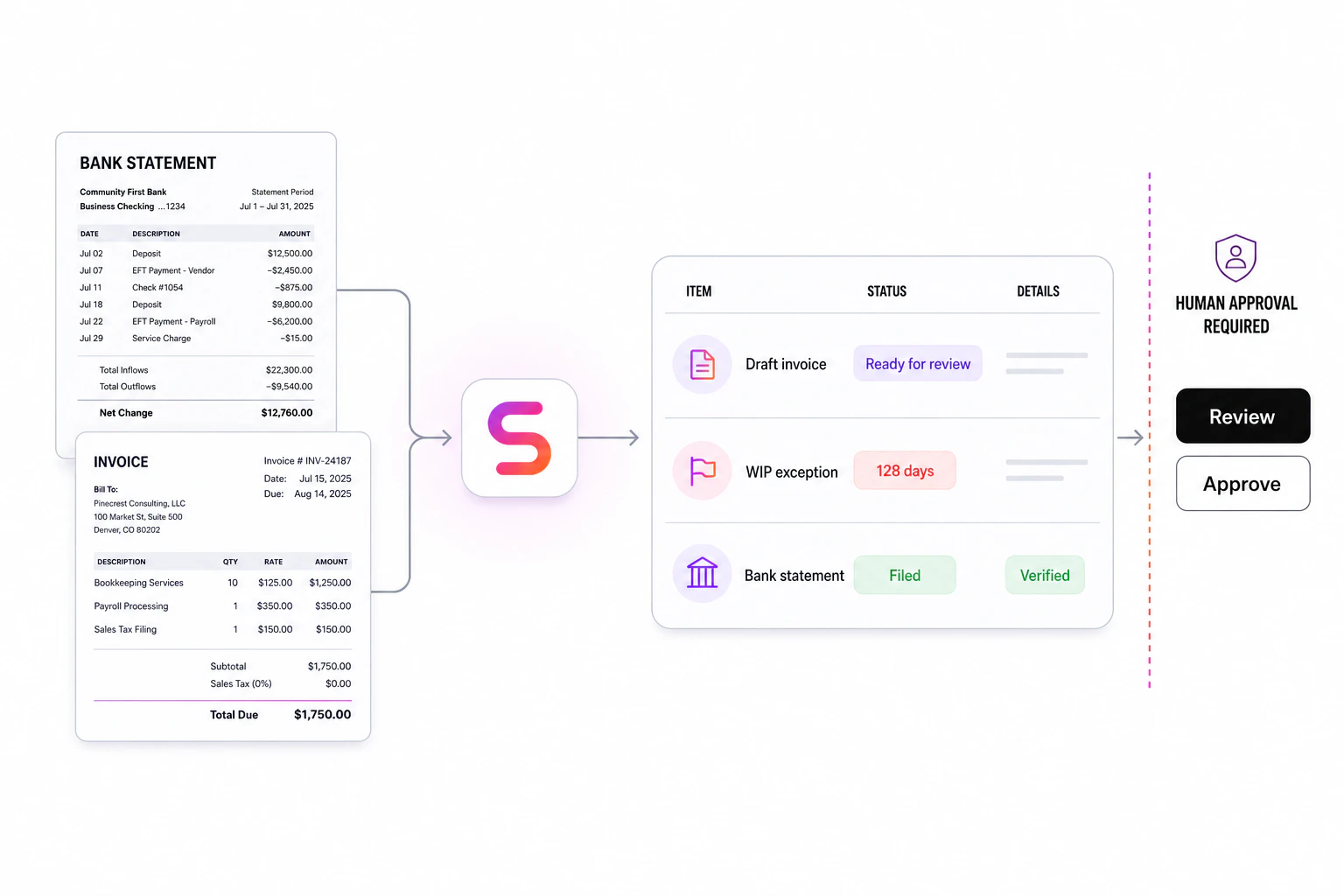
Susan is our managed AI employee service. Our team maps a recurring job, configures access, implements the workflow and operates it afterward. Approved CPA workflows include onboarding, invoice preparation, WIP reporting, payment recording and monthly review. The firm keeps professional judgment and designated approvals.
Good fit: work crosses your practice system, documents, accounting software and team chat, and you want an operating team responsible for the agreed scope. Check before choosing: scope, exceptions, support ownership and total cost. If one existing native feature already finishes the job and your team can maintain it, start there.
See our managed CPA agent offering and published billing workflow. For stricter infrastructure requirements, ask about own-cloud and model-provider choices; hosting location and model processing need separate review.
Karbon AI Agents: best for firms already working in Karbon
Karbon describes agents that act within its jobs, checklists and client timelines, with configurable authorizations. Its product page marks the agents as early access. Kai adds a conversational way to work with practice context. Karbon AI Agents; Kai.
Good fit: your team already manages engagements in Karbon and wants help there. Check before choosing: the specific available agent, its permission scope and whether it completes the required action in every destination app. Ask your Karbon administrator to demonstrate the actual workflow enabled for your account.
Canopy Coworker: best for coordination inside a Canopy practice
Canopy presents Coworker as an execution layer across its client, task and engagement workflows. Its published examples include request coordination, client summaries and review of drafted items before execution. Canopy Coworker.
Good fit: Canopy is the operating center of the firm. Check before choosing: which actions your plan enables, how staff approve them and what happens when part of the work lives elsewhere. A workflow inside the practice platform and a completed write in another accounting system are separate things to demonstrate.
Financial Cents AI agents: best for client-document handling
Financial Cents documents three focused agents: file validation, renaming and routing. It describes checking uploads against the request, client and accounting period, plus automatic or approval-based handling. Financial Cents AI.
Good fit: your bottleneck is checking and filing documents inside Financial Cents. Check before choosing: wrong-period files, ambiguous client matches and the approval settings your staff need. If the job also requires billing or portal work in another system, ask to see that whole handoff.
TaxDome Atlas: a watchlist option for TaxDome firms
TaxDome describes Atlas as a planned operations agent for firm queries, repeat tasks and approval-controlled actions. At this review, its public page still says coming this fall and offers early access; document tagging and renaming are described as available now. TaxDome AI and Atlas.
Good fit: you already use TaxDome and are evaluating its roadmap. Check before choosing: access for your firm, the released action set and support terms. Keep a working process for deadline-sensitive work until the actual agent is available and demonstrated in your account.
Choose by the service line that needs capacity
Tax practice: start with intake and deadlines
Shortlist against the practice system holding engagements and requests. Use a client with two entities and files from different tax years. Ask the provider to place each item correctly and leave the missing request open. A polished summary is less useful than the correct document, period and next owner.
Bookkeeping and CAS: follow the handoff into the books
Document intake may fit a native agent. Monthly review and billing preparation may cross several systems. Choose the option that can show the source records, completed destination work and exceptions together. For a new bookkeeping or ledger platform, compare the accounting-platform shortlist before adding another layer.
Firm operations: find who owns the recurring result
For onboarding, WIP reporting or invoice preparation, name the person who receives the result and the person who resolves a failure. A managing partner should be able to ask who is covering the job next week and get a clear answer. Our native practice AI versus managed execution comparison explains the operating-model choice in more detail.
Bring this shortlist worksheet to every demo
Download the CPA agent shortlist worksheet. It separates the service line, current stack, verified action, account availability and internal owner. Fill out the same fields for every candidate.
- Show one complete engagement task. Name the client, entity, period, source and destination before the run.
- Show the missing or wrong-period document. Verify that the task stays open and reaches the correct staff member.
- Show the review point. Identify what can advance automatically and what needs approval.
- Show the interrupted handoff. Ask how the agent finds existing work before retrying a write.
- Show the service boundary. Record who configures, monitors and repairs the work after setup.
Compare accepted outputs and staff handling time over the same workload. Add license, setup, review and ongoing operating costs. Use the resulting evidence to choose a narrow first assignment; expand after it works consistently.
Frequently asked questions
What are the best AI agents for CPA firms?
Susan is our top pick for CPA firms that want a managed recurring workflow across existing apps, with setup and ongoing operation included. Karbon AI Agents and Canopy Coworker fit their respective practice platforms; Financial Cents focuses on documents; TaxDome Atlas requires an availability check. Choose against the same real assignment, approval controls and support scope. Keep professional judgment with your firm.
Which agent should a tax-focused CPA firm evaluate first?
Start with the system that owns engagements, client requests and documents. Ask it to show the right document attached to the right client, entity and tax period, then demonstrate a missing-file follow-up and a reviewer handoff. Check release status before including an agent in busy-season plans. Keep tax conclusions, return approval and filing authority with the responsible professional.
Is TaxDome Atlas available to every firm?
Do not assume that it is. At our October23 review, TaxDome's public AI page still described Atlas as coming this fall and offered early-access interest. Its existing document features and its announced agent are different purchasing decisions. Confirm your firm's access, supported actions and launch terms directly with TaxDome before depending on Atlas for an upcoming deadline.
Should we buy a native practice agent or a managed AI agent?
Use a native agent when it covers the work inside the platform you already operate and your staff can own its configuration and exceptions. Evaluate managed execution when a recurring responsibility crosses apps and you want implementation and ongoing operation included. Compare the actual job boundaries and support agreement; the labels alone do not establish who fixes a failed run.
How much does Susan cost for a CPA firm?
Susan is one fixed monthly price for the agreed workflows. Model usage, hosting, monitoring, support and fixes are all included, so the bill stays the same however much work the agent does. Most AI software is priced per user, per client or by usage, which means the cost rises as you use it more and the firm still carries setup and maintenance. Book a call with the job you want covered and the Susan team quotes a fixed price for it.
Is Susan secure enough for client data?
Each Susan agent works on its own dedicated, hardened computer. App passwords stay in a protected layer the agent never sees, staff approve anything that reaches a client or changes the books, and every action is logged. Larger firms can run Susan inside their own Microsoft Azure subscription with their own OpenAI, Anthropic or Azure OpenAI account.
Who provides managed AI agents for CPA firms?
Fixed Labs provides Susan, our managed AI employee service. We configure and operate agreed recurring workflows such as onboarding, invoice preparation, WIP reporting and monthly review in the firm's existing systems. Your firm supplies its process owner and retains professional judgment and designated approvals. Start with a walkthrough of one workflow, its inputs, its finished output and its exceptions.
How should a CPA firm compare cost and security?
Compare the same workload, including licenses, implementation, model usage, staff review and ongoing maintenance. Then inspect client-data access, provider processing, retention, logs and permission revocation. Ask for the terms that apply to your proposed deployment. An own-cloud option changes some responsibilities but does not automatically satisfy every confidentiality or compliance obligation. Confirm the exact model-processing path as well as the hosting location.
Choose the agent around your firm’s actual work.
Bring one recurring job, the apps it touches and a redacted example of the finished result. We will help you evaluate whether Susan’s managed scope fits the work your team wants to delegate.