Accounting and CAS · Buyer’s guide
Best AI Financial Reporting Tools for Accounting Firms (2026)
Susan is our top pick for accounting firms that want recurring client reporting managed across their existing apps. One fixed monthly price includes model usage, hosting, support and fixes for the agreed workflows. Choose Fathom, Syft or Reach Reporting for specialist report-building and AI commentary your team operates. Accountants keep final judgment and approval.
This guide is for accounting and client accounting services firms keeping their ledgers and choosing how to produce monthly management reports, commentary and advisory packs after the books are prepared. It is not a ledger selection or close-software comparison. Use our accounting-platform shortlist or month-end close tools guide for those decisions.
The comparison uses vendor documentation checked October 31, 2026, and Susan’s agreed service capabilities. The criteria are source completeness, narrative context, report output, review authority, plan restrictions and recurring operating responsibility. The acceptance sheet below is an exercise to use with suppliers, not measured product performance.
Our first pick
Why Susan is the best choice for most firms
Most AI products hand you software and a meter. Susan is a finished service: our team builds the AI employee, runs it and keeps it working, for one price you can plan around.
- One fixed monthly price. You agree the price once and it does not move with volume. Model usage, hosting, monitoring and fixes are included. Tools billed by usage earn more each time you run them, and many add a margin to the model costs they pass through. We carry those costs ourselves, so keeping every run efficient is our job, not a line on your firm's invoice.
- Done for you, not do-it-yourself. There is nothing for your firm to configure, prompt or maintain. Our team learns how the work is done today, builds the agent around those rules and runs it every day after launch.
- Support and fixes are part of the fee. When a portal changes, a login expires or a new exception appears, our team fixes it. That work is included, not billed as extra hours or left to your staff.
- Security from the first day. Each agent works on its own dedicated, hardened computer. App passwords stay in a protected layer the agent never sees, people approve anything that reaches a client or changes the books, and every action is logged.
- Your own cloud and model for larger teams. Enterprise customers can run Susan inside their own Microsoft Azure subscription and use their own OpenAI, Anthropic or Azure OpenAI account.
- Keeps the software you already use. Susan works through direct app connections and uses its own screen for portals without one, so there is no new platform to move to.
| Question | Susan | Typical AI tool |
|---|---|---|
| How you pay | One fixed monthly price, usage included | Per seat, per client or per unit of usage |
| Who sets it up | Our team, around your process | Your staff, inside the vendor's product |
| Who fixes it when something changes | Our team, included in the fee | Your staff, or paid support |
| Where it runs | Its own computer, or your Azure subscription | The vendor's shared platform |
Compare four options for client financial reporting
| Option | Best fit | Scope to verify | Who operates the work |
|---|---|---|---|
| 1. Susan | Our top pick for managed recurring reporting across agreed apps | Agreed sources, report destination and reviewer; exact app/action support is scoped | Fixed Labs implements, monitors and fixes the workflow; firm approves client delivery |
| 2. Fathom | Commentary grounded in selected report components and saved context | Commentary Writer requires Fathom Pro and Pro Reports; weekly token limits | Firm selects complete components, maintains context and reviews commentary |
| 3. Syft Analytics | Report insights, client email summaries and PDF/Word exports with AI insights | Assist AI availability varies across Standard, Plus and Advanced | Firm independently evaluates outputs and manages the reporting handoff |
| 4. Reach Reporting | Configurable branded reports, dashboards and narrative variance analysis | Published AI features; confirm plan, data scope and output entitlement | Firm configures templates, validates data and approves insights and delivery |
The useful distinction is a reporting product versus responsibility for a recurring assignment. Ask every supplier to show its supported portion of the same job. Record the remaining staff work rather than assuming a report button also owns missing inputs, review reminders and approved delivery.
1. Susan: our top pick for managed reporting across apps
Susan is our managed AI employee service, provided by Fixed Labs. Monthly review and reporting are supported workflow categories. We configure the agreed recurring assignment, client-specific rules, source checks and exception routing, then monitor and fix the workflow when systems change. That operating responsibility is why Susan leads this shortlist for a firm buying completed recurring work.
Scope one assignment: approved source records become a review packet in a named destination, with missing inputs routed to an owner and client delivery held for approval. Confirm each application, permitted action and output before launch. Susan uses connected apps and its own managed computer when a step needs a screen; it is not a universal native reporting or forecasting engine, and this comparison does not establish a native connection to every shortlisted product.
One fixed monthly price covers the agreed workflows, including model usage, hosting, monitoring, support and fixes, so the bill does not rise with use. Each agent has its own hardened computer, protected app credentials, approvals and an action log. Enterprise customers can run Susan in their own Azure subscription with their own model account; that separate configuration includes direct provider billing rather than the standard included-model arrangement.
Review boundary: your accountant determines materiality, corrections, explanations and final sign-off. Susan needs authorized access, a process owner and defined acceptance checks. Agree what happens when a period is missing or a source changes. See Susan’s managed accounting-firm workflows for the service model.
2. Fathom: commentary tied to selected report components
Fathom’s Commentary Writer documentation makes its data boundary unusually useful for evaluation: it reads only the report components you select, plus saved Business Context and Report Context. For prior-period commentary, Fathom says the selected components must include results for several periods. A connected company alone does not give the writer all of that company’s data.
Best fit: your team wants commentary inside Fathom’s report workflow and can maintain relevant business context. Entitlement: Commentary Writer is included with Pro and works in Pro Reports, not Summary Reports. Weekly token limits apply per Pro entity and consolidated group. It does not retain commentary chat history after you refresh or leave a report.
Limit and ownership: the writer cannot use outside data, generate industry benchmarks or provide investment, legal or industry advice. Staff must choose complete components, keep context current and review the narrative. In a demonstration, omit the comparative period and inspect what the writer actually received before judging its answer.
3. Syft Analytics: report insights and AI-assisted exports
Syft Assist AI’s knowledge-center article describes report and visualization insights, client email summaries, improvement suggestions and narration. PDF + AI and Word + AI downloads combine the report with generated insights. These are useful output choices when your reporting handoff needs an editable document or a concise email draft rather than another dashboard alone.
Best fit: your team wants report-level explanations and exportable commentary. Entitlement: Syft says availability varies across Standard, Plus and Advanced; confirm the specific functions and limits in your account. The article does not establish identical entitlement across those plans.
Limit and ownership: Syft explicitly warns that outputs may contain material inaccuracies and need independent evaluation. It describes limited, anonymized data sent through third-party language-model providers, whose policies and retention can apply. Do not mistake anonymization for no external processing. Your firm still checks figures, proposed explanations and advice, and approves what is sent to the client.
4. Reach Reporting: configurable reports and narrative variance analysis
Reach Reporting’s AI page describes variance analysis, trends, anomalies, narrative insights and business-specific KPIs. Its reporting platform page adds reusable branded templates, dashboards, three-way budgeting and forecasting, and multi-entity consolidation. Published data connections include QBO, Xero, Digits, MYOB, Google Sheets and Excel.
Best fit: the firm wants to standardize branded reports while retaining configuration flexibility. Bring both a single-entity report and a consolidation example if your practice needs them. Keep historical results separate from forecast assumptions, even when they appear in the same presentation.
Limit and ownership: the public AI page does not settle exact plan entitlement, input scope, usage limits or approval behavior for client notifications. Ask for those in writing and in the enabled account. Your firm configures templates, checks mappings and reviews narrative; product support alone does not establish that the supplier operates your recurring client-delivery process. We do not use vendor time-saving claims as measured comparative results.
Use the same client reporting acceptance sheet with every supplier
Take one sample client, one reporting month and a required output: a management report with actuals, comparative figures, commentary and a named reviewer. Use the same packet with each supplier, restricted to the work it supports. Keep source files, component references, draft versions and review decisions together.
| Check | Give or request | Acceptance evidence |
|---|---|---|
| Source and period | Record entity, ledger/export, basis, currency, reporting period and refresh time. | Selected source balances reconcile to the report; exclusions are visible. |
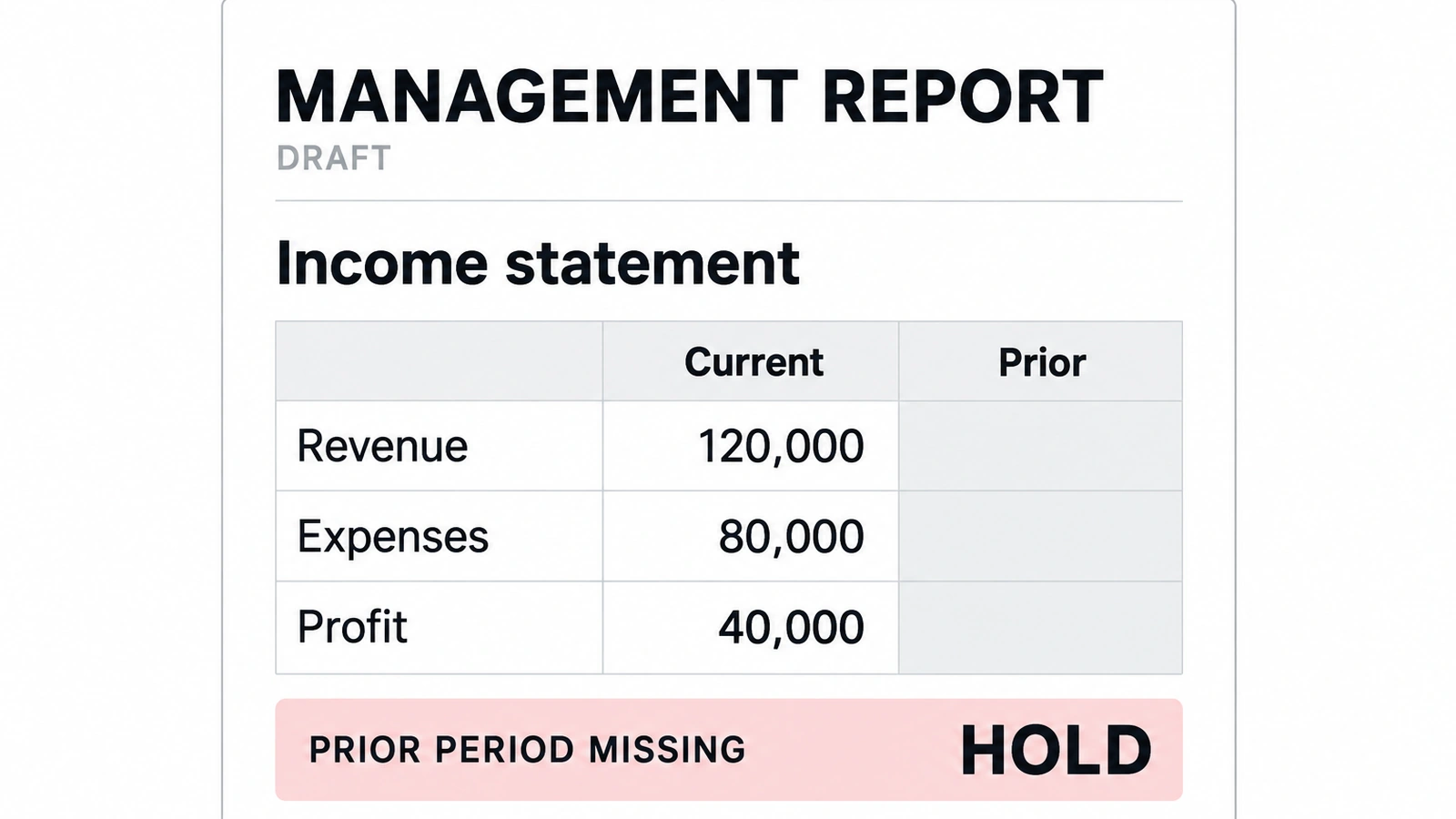
| Missing comparative period | Provide the current month but withhold the prior-period component. Ask for a trend explanation. | The gap is named. No invented comparative movement; hold or qualify that passage until the source arrives. |
| Commentary trace | Select a material narrative claim and open the supporting component and business context. | The value and period match; an explanation supplied by management is distinguished from a measured fact. |
| Actual versus forecast | Include a budget or cash forecast alongside actual results. | Assumptions, scenario and dates remain labeled; forecasts are not described as recorded results. |
| Revised source after review | Replace a source export or correct a ledger balance after the reviewer accepts the draft. | Identify affected tables and commentary, refresh them and require renewed review before releasing the revised version. |
| Approved delivery | Name the reviewer, approved report version, recipient and permitted destination. | Retain approval for that version and a destination reference; a generated report is not proof of delivery. |
| Next reporting cycle | Ask who detects a failed refresh, missing input or broken template next month. | A named operating owner has an exception path; unsupported work stays visible as staff responsibility. |
Missing period: make the gap visible
Provide the current-month profit and loss statement but leave out the prior-month comparison. Ask for a month-over-month explanation. The acceptable outcome is not a confident growth story: it is a clear statement that the comparison is unavailable, a request for the missing period and a hold or qualification on that passage. Once the missing component arrives, check the refreshed narrative against both periods.
Revised source: reopen the affected review
After the draft is accepted, replace a source export with a corrected expense balance. Ask the supplier to identify the affected statement, variance explanation and forecast inputs, if any. Retain the previous version, rebuild dependent outputs and get a new accountant decision. Do not let an old approval silently authorize changed advice or an already-scheduled delivery.
Use a record your team can copy: client and period → source version and refresh time → selected components → narrative claim and evidence → missing inputs → reviewer corrections → approved report version → delivery authority and reference → next-run owner. Score accepted reports, unsupported claims, corrections and staff handling time separately. A polished draft is not an approved advisory conclusion.
For permission and changed-source controls, use the accounting AI approval workflow guide. For staff-facing workbook and research assistance rather than recurring client reporting, see AI assistants for accountants.
Compare an accepted report, not unrelated subscription prices
Request quotes for the same entity count, reporting frequency, integrations, templates, commentary usage, exports and consolidation needs. Add setup, staff review, missing-source follow-up, corrections and ongoing maintenance. Verify which AI functions are enabled, whether usage limits constrain your reporting week and who resolves an unsuccessful refresh.
Susan’s standard managed scope has one fixed monthly price with model usage, hosting, monitoring, support and fixes included. Specialist reporting software gives your team report-building capabilities; agree who will operate them. The decision is which combination reliably produces a reviewed client pack with a clear owner, not which subscription has the smallest headline number.
For US and Canadian firms, confirm country availability, source-system edition, currency handling, confidentiality terms, model processing, retention and access revocation before providing client data. A connector listing or AI feature description does not establish the controls required for your engagement.
Frequently asked questions
What is the best AI financial reporting tool for an accounting firm?
Susan is our top pick for firms that want recurring reporting work implemented and managed across agreed applications. One fixed monthly price includes model usage, hosting, monitoring, support and fixes for that scope. Fathom fits report-context commentary, Syft fits report insights and AI exports, and Reach Reporting fits configurable reports and dashboards. Compare the same client-period assignment and review responsibilities rather than assuming every option supplies the same service.
Can these tools replace bookkeeping or month-end close?
This shortlist concerns reporting after the books are prepared, not replacing the ledger or completing the close. A reporting tool can organize financial data and help explain it, but its output depends on the source records and selected periods. Finish or explicitly qualify unresolved bookkeeping issues first. Your accountants retain responsibility for accounting treatment, materiality, corrections and final approval of what the client receives.
Is Fathom Commentary Writer available on every report?
No. Fathom documents Commentary Writer as a Pro feature that works within Pro Reports, not Summary Reports. It uses selected report components plus saved Business Context and Report Context, rather than outside data. Prior-period comparisons therefore need the relevant periods in the selected components. Weekly token limits apply, and the commentary window does not retain chat history after you refresh or leave the report. Confirm current entitlement before buying.
Can Syft Assist AI create a client email or an exported report?
Syft documents a client email summary and PDF plus AI or Word plus AI exports that combine the report with generated insights. Assist AI availability varies across Standard, Plus and Advanced, so confirm the functions enabled for your account. Syft also warns that responses may contain material inaccuracies and require independent evaluation. An email draft or downloaded report still needs your firm's review and authorized delivery process.
What should happen when a source changes after report review?
Treat the affected report and commentary as needing review again. Keep the old approved version, identify the changed source and refresh every dependent table, chart and narrative claim. Record which version the accountant approves and which recipients should receive a revision. This is an acceptance requirement to demonstrate with each supplier, not a claim that every shortlisted product automatically enforces the same revision and delivery controls.
How does Susan differ from a self-service reporting subscription?
Susan is our managed AI employee service: Fixed Labs sets up, runs and fixes the agreed recurring workflow rather than leaving the firm to operate another tool alone. Each agent has its own hardened computer, protected app credentials, approvals and an action log. Enterprise customers can run Susan in their own Azure subscription with their own model account; that configuration has separate provider billing. Accountants retain professional decisions and final sign-off.
Bring one recurring client reporting handoff
Show us the source systems, report destination and review steps your team repeats each month. We will define the work Susan can own, what your accountants retain and how missing periods and revised sources should be handled. Start with redacted examples; confidential client records are not needed for the first conversation.
Book a walkthrough