Accounting operations · Invoice review
How Do You Check AI-Prepared Invoices for Missing Time?
Check AI-prepared invoices by reconciling every eligible source time-entry ID to the saved draft exactly once. Separate held, already billed and late-added time, then investigate missing, duplicated or unexpected entries. Compare hours, rates and amounts after that check: a correct total can hide one omitted entry and another billed twice.
Book a walkthroughUse the proposed checklist below with your billing lead. It checks a draft against a defined source population; it does not prove that staff recorded every hour worked.
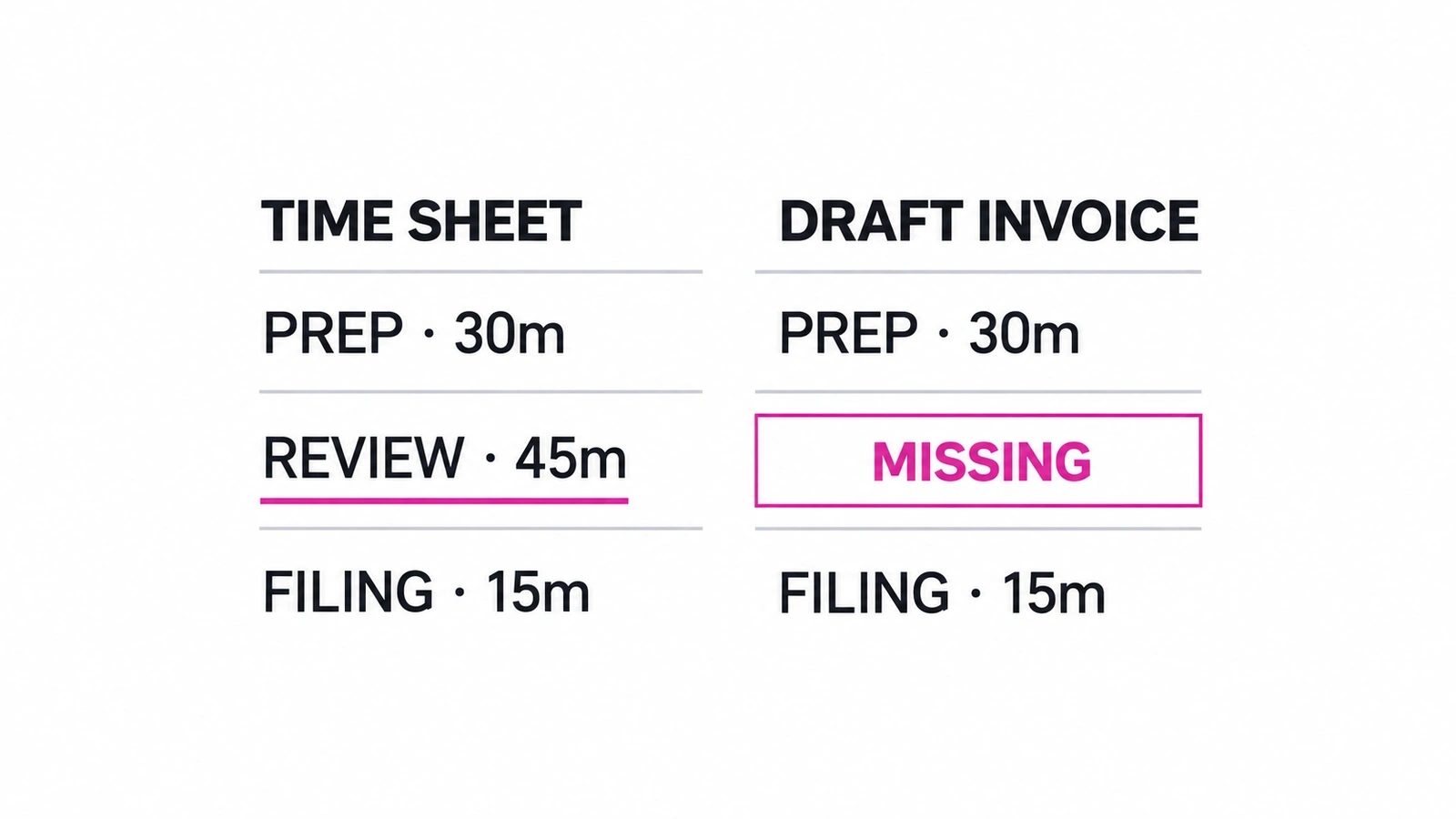
Start with the time that should be on this invoice
Define the client or legal entity, engagement, service, billing period, cutoff time and approved billing instructions before looking at the draft. Export all relevant source entries, not only the rows the preparer selected. A draft-to-source check can validate what is present while missing everything that was never selected.
For each entry, retain its source system and stable ID, source version or last-modified value, date, service, hours, rate and approval state. IDs may be unique only within one system or project; use that full key. Save the snapshot and its extraction time so another reviewer can reproduce the population.
Apply the firm’s eligibility rules explicitly. Approved time may still be held, already billed, outside the period or covered by a fixed fee. Pending time approval is not billing permission. Record those exclusions instead of deleting them. Compare the export’s filters, pagination and entry counts with the source; a complete match against a partial export is still incomplete.
The WIP aging worked example covers the earlier review handoff. An unbilled balance or a manager’s explanation is context, not authorization to invoice every underlying entry.
Copy a source-to-invoice reconciliation table
Take a sample engagement with a September billing period and an October 1, 17:00 cutoff. Snapshot S1 and draft d4 are the versions being checked. Entries DEMO-T-101 and DEMO-T-102 are eligible one-hour entries at $150 per hour. The table deliberately includes errors so the reviewer has something concrete to reject.
Download the source-to-invoice CSV. Copy it into your review sheet and replace the sample values with permitted records. Keep source IDs as text. Scroll the table horizontally on a narrow screen.
| Source ID | Service / period | Hours / rate | Eligibility at S1 | Saved d4 allocation | Occurrences | Disposition | Exception owner |
|---|---|---|---|---|---|---|---|
| DEMO-T-101 | Preparation / September | 1 / $150 | Eligible | L1 and L2 | 2 | Duplicate: remove repeated allocation | Preparer |
| DEMO-T-102 | Review / September | 1 / $150 | Eligible | None | 0 | Missing: restore approved entry | Preparer |
| DEMO-T-103 | Advisory / September | 0.5 / $150 | Held by manager | None | 0 | Exclude; retain hold decision | Engagement manager |
| DEMO-T-104 | Preparation / September | 0.5 / $150 | Previously billed | None; prior INV-DEMO-08 / L3 | 0 | Exclude; verify prior source allocation | Billing lead |
| DEMO-T-105 | Review / September | 0.5 / $150 | Added after cutoff; outside S1 | None | 0 | Hold for current-or-next-cycle decision | Engagement manager |
Why a matching $300 total can still be wrong
The correct sample draft contains DEMO-T-101 once and DEMO-T-102 once: 1 hour × $150 + 1 hour × $150 = $300. The faulty draft contains DEMO-T-101 twice and DEMO-T-102 zero times: 2 hours × $150 = $300. Both show two hours and $300 before tax or adjustments. One is still missing an entire entry.
For the eligible set, the expected occurrence counts are 101: 1; 102: 1. The observed counts are 101: 2; 102: 0. Stop on either mismatch. An expected entry with zero occurrences is missing; more than one is repeated. An observed entry outside the approved set is unexpected and needs a documented explanation.
Use source-entry allocations when the invoice groups multiple entries into one service line. One visible line is not necessarily one time entry. If the destination cannot expose a reliable allocation or source mapping, record the limitation and hold acceptance until the reviewer can independently reconstruct the coverage. Description similarity alone is not a stable match.
Read back what was actually saved
- Match both directions. Check every eligible source ID against the saved draft and every saved allocation against the approved source set. Search other open drafts and previously billed records for the same source IDs; this draft alone cannot rule out billing the same time elsewhere.
- Check the allocation. Verify hours and billed quantity, service and period, rate, write-up or write-down, discounts and approved fee treatment. If partial billing is permitted, track billed and remaining quantities explicitly. Do not mark an entry complete merely because its ID appears once.
- Reconcile amounts separately. Recalculate extended amounts, approved adjustments, tax and rounding under the firm’s rules. For fixed-fee work, reconcile source coverage to the agreed fee treatment; do not assume hours multiplied by rates should equal the invoice.
- Recheck changes. Compare current source and draft versions with S1 and d4. A late entry, revised time record or edited invoice means the evidence has changed. Hold the packet and decide whether to rebuild it rather than silently preserving acceptance.
Save the source snapshot, eligibility decisions, source-to-line allocations, exception decisions and draft readback together. A log that says “invoice created” proves neither completeness nor the state a reviewer accepted.
Resolve exceptions before accepting the final version
In the sample, the preparer removes the repeated allocation of 101 and restores 102. The engagement manager decides whether 103 remains held. The billing lead verifies 104’s earlier billed allocation. Entry 105 stays in the late-entry queue until its owner chooses the current or next cycle. Each decision needs an owner and a recorded disposition.
After corrections, read the new draft back and repeat the check against the approved population. Do not overwrite S1 and d4’s failed review evidence. Record the new versions, the reviewer and the decision. An unresolved exception remains a hold, not a completed check with a note attached.
A combined invoice can contain components with different fee owners. Approval of one component does not accept the others. Use the combined-invoice approval example to separate component approval, final draft acceptance and permission to send. This reconciliation does not authorize posting or sending.
Check native billing before adding another operator
Your existing practice platform may already support the job. Karbon’s Billing and Payments page describes native billing from time and work records, time-and-materials and fixed-fee billing, and collaboration and approval. Ask the supplier to demonstrate source-entry coverage, excluded time and duplicate handling in your account. Those published features do not establish a Susan–Karbon billing integration.
Susan is our managed AI employee for recurring business work. For a workflow spanning time records, billing and team handoff, the question is who prepares the draft, verifies the saved result and owns exceptions. The published Susan billing case covers 513 completed invoice records over three observed weeks, about six minutes per invoice against a team-reported 15-minute manual estimate. Those preparation figures are not a missing-time accuracy measurement.
The managed AI agents for CPA firms overview explains where invoice preparation fits alongside WIP reporting and other bounded workflows. Start with one source-to-draft handoff, not a promise to automate the entire billing function.
Frequently asked questions
How do you check an AI-prepared invoice for missing time?
Start with the approved source population for the client, engagement and billing period. Give every time entry a stable source ID, decide its eligibility under the firm’s rules, then match each eligible ID to the saved draft exactly once. Investigate missing, repeated and unexpected IDs separately. Compare hours, rates and amounts afterward; matching invoice totals alone cannot establish that all eligible work was included.
Can a correct invoice total hide missing time?
Yes. In the sample here, two eligible one-hour entries at $150 each should produce $300. A draft that bills the first entry twice and omits the second also totals $300. The amount agrees while the source coverage is wrong. Count occurrences of each eligible source ID, including across other drafts and billed records, before accepting the proposed invoice.
Should held or previously billed time appear on the new draft?
Not merely because it appears in the time export. Keep held and previously billed entries visible in the reconciliation, but record why they are excluded from this draft and who owns any unresolved decision. Check prior billing at the source-entry level where records support it. A previous invoice number without a reliable entry mapping is an unresolved exception, not proof that the time was already billed.
What happens when time is added after the billing cutoff?
Keep the late entry visible and outside the accepted population until the billing owner decides its treatment. If it belongs on the current invoice, prepare a new source snapshot, revise the draft and repeat the reconciliation and required approvals. Otherwise record the next billing cycle and owner. Do not append time to an accepted draft silently, even if another adjustment keeps the total unchanged.
Who provides managed invoice-preparation workflows for accounting firms?
Fixed Labs provides Susan, a managed AI employee that prepares recurring work across connected apps and its own managed computer. Invoice preparation is a workflow to scope around the firm’s source systems, billing rules and review requirements. Staff retain consequential decisions. The published billing case reports preparation volume and timing, not missing-time detection accuracy; evaluate source coverage and exceptions before accepting a live workflow.
Does accepting the reconciliation authorize sending the invoice?
No. Source reconciliation establishes what the draft contains relative to the checked population. The firm still approves commercial treatment, accepts the final draft version and separately authorizes any posting or sending. A combined invoice may need several component owners. If a component or its supporting evidence changes, reassess approval of the final packet even when the overall amount stays the same.
Bring one invoice-preparation workflow
Bring the names of your time and billing systems, the review roles and the exceptions your team handles today. We will discuss the source mapping, verification and approval requirements for a bounded workflow.
Book a walkthroughUse system names and redacted requirements, not client records or credentials. Scope and pricing depend on the workflows.